Best Smart Locks (2026): Matter, Thread, and Home Key Picks
My top smart lock picks for 2026, with Matter/Thread and Apple Home Key options, plus a quick buying guide.
If you have ever done the "did I lock the door?" panic-walk back to your front steps (same), the best smart lock is basically anti-anxiety hardware. In 2026, the smart-lock world is finally getting less weird: more locks support Matter and Thread, more of them play nicely with Apple Home, Google Home, and Alexa, and the good ones feel fast instead of "tap the app and wait for vibes."
I focused on four things that actually matter in real life: reliability (does it unlock every time), speed (does it unlock now, not eventually), entry options (keypad, phone, Home Key, fingerprint), and how painful the install will be. Below are my favorite picks - plus a quick buying guide so you do not accidentally buy the wrong module or a lock that needs three hubs to do one job.
Our Top Picks
Aqara Smart Lock U400
Downsides: Full deadbolt replacement install (not a quick retrofit), and you may hop between the Apple Home app and Aqara app for a few settings.
If you are deep in Apple Home, the U400 is the most futuristic lock that also feels practical. The headline feature is Ultra Wideband (UWB) auto-unlock, which can unlock the door as you approach, before your hand even reaches the handle, and it supports tweaking approach direction in the Home app. It also does NFC "tap to unlock" with Express Mode on iPhone/Apple Watch (no Face ID dance), plus a passcode touchpad, fingerprint support (set up in Aqara app), app control, automations, and a hidden physical key for those "my phone is dead" moments.
Installation is more involved than a retrofit turner - you are swapping the deadbolt - but the upside is you get a full, integrated lock mechanism. One reviewer installed two locks in about an hour, and noted the lock can power through a door that used to stick thanks to the full replacement. Battery is rechargeable via USB-C and is rated up to about six months per charge, which is a nice change from the world of disposable CR123A cells.
Source notes: 9to5Mac lists the U400 at $269.99 on Amazon and calls out NFC Express Mode, UWB auto-unlock, passcodes, fingerprint, a hidden key, and USB-C recharging. See the full review here: 9to5Mac Aqara U400 review.
Schlage Encode Plus (Wi-Fi)
Downsides: Uses Wi-Fi (great for remote access, not always great for battery), and availability/pricing can bounce around.
The Encode Plus is the one I recommend when someone says, "I do not want to become a part-time smart-lock IT department." It is a full smart deadbolt with a keypad, remote control, and Apple Home Key support, and it is widely recommended as a higher-end pick.
Reviewed calls the Schlage Encode Plus its "Best Upgrade" smart lock and highlights Apple Home Key support, Wi-Fi connectivity, support for Siri/Alexa/Google Assistant, a built-in alarm, and strong warranty coverage. See: Reviewed: The Best Smart Locks.
If you care about a straightforward setup and you like the idea of giving family members their own PIN codes (or temporary guest codes), Schlage makes that easy. The lock is not trying to be invisible. It is trying to be dependable, and that is what you want on your front door.
Yale Assure Lock 2 (with the right module)
Downsides: Yale sells multiple versions/modules, so you need to buy the one that matches your ecosystem (and that complexity is annoying).
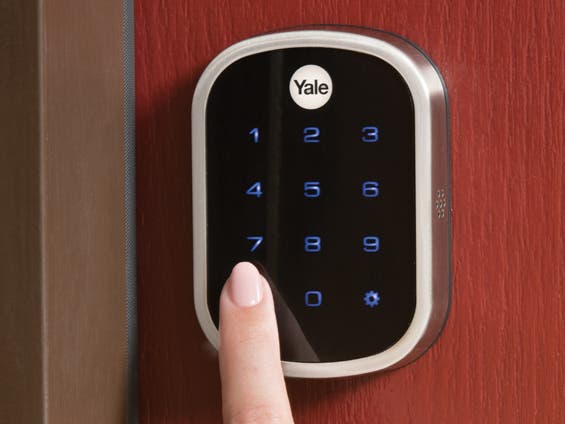
Yale is the "boring in a good way" brand in this space. The Assure line has been around forever, and the newer Assure Lock 2 family has lots of variants - keypad, keyway, module choices, etc. The feature I love in concept is door sensing: if your door is not fully shut, the lock can delay auto-locking until it is actually closed (or at least report the state accurately). That is the difference between feeling safe and having a lock confidently tell you it locked a door that is still cracked open.
In a long-term comparison of Apple Home Key locks, Power Moves says the Yale Assure 2 Plus had Home Key failures only "less than a few times" over six months, and notes that DoorSense can delay locking until the door is shut, while also calling out that the Yale motor feels stronger than Level. See: Power Moves Level vs Yale Home Key lock testing.
Level Lock+ (for people who hate the look of smart locks)
Downsides: No built-in keypad, and Home Key reliability can be worse than the big deadbolt-style locks.
Level makes the stealth lock. From the outside, your door does not scream "smart home guy." It just looks like a normal deadbolt, and for some people, that is the whole point.
The tradeoff is that you are choosing vibe over features. Power Moves reports Home Key fails about 10% of the time on the first attempt in their testing, and notes Level is missing door sensing and a keypad. See: Power Moves Level vs Yale Home Key lock testing.
Buying Guide: How to Pick the Right Smart Lock
1) Decide if you want a retrofit smart lock or a full deadbolt replacement
A retrofit smart lock is the "keep your existing key and hardware" style - usually only the interior thumbturn changes. It is often easier to install and looks less techy from the outside. A full replacement smart deadbolt swaps the whole lock - more work, but sometimes more reliable and more feature-rich.
2) Matter smart lock vs Wi-Fi lock: what it changes
A Matter smart lock is designed to work across ecosystems using a common standard. In practice, it can mean fewer app wars and smoother interoperability, especially when paired with Thread. The catch: you may still need a compatible hub (like an Apple TV or HomePod for Apple Home, or a Thread border router) to get the best experience.
A Wi-Fi lock often gives easy remote access without a separate hub, but Wi-Fi can be heavier on battery life and sometimes slower to respond than Thread-based setups.
3) If you want Apple Home Key, prioritize reliability over clever features
An Apple Home Key smart lock is the most magical day-to-day unlock method when it works well: tap your phone/watch and go. But implementation matters. Some locks nail it, some are "try again" machines. If you want the least drama, pick a lock that has a solid reputation for Home Key consistency and keep a backup method (keypad or physical key) for guests and weird edge cases.
4) Keypad vs no keypad is a lifestyle decision
I know keypads look slightly "Airbnb," but they are unbelievably useful for dog walkers, babysitters, and family. If you skip a keypad, make sure your lock supports other easy guest access, or you will end up doing the "text me when you arrive" routine forever.
5) Internal links: keep exploring ByteBlip
- If you are building a smarter home setup, you might also like our guide to humidity control: Best Dehumidifier (2026).
- And if you are deep in the Apple ecosystem already, our display roundup is a fun rabbit hole: Best 85 Inch OLED TVs in 2026.
Bottom line: if you want the smoothest Apple-first experience, start with Aqara U400. If you want a premium, widely recommended deadbolt with Home Key, Schlage Encode Plus is a safe bet. If you want door sensing and a more traditional brand vibe, Yale is worth the module homework. And if you want a smart lock that does not look like one, Level is still the stealth king - just do not expect it to be the most forgiving option.
Byteblip
New Products, Gift Guides, The Best Deals