
Best Portable SSDs (2026): 5 External SSDs for Speed, Backup, and Video Editing
From USB4 SanDisk speed demons to budget Samsung shields, the best portable SSDs for backups, video editing, and everyday file storage.
Looking for the best portable SSD in 2026? External SSDs have quietly become one of the best tech upgrades you can buy. They're tiny, ridiculously fast, and the price-per-gigabyte has dropped to the point where a 2TB drive costs less than a nice dinner out used to. If you're still using a spinning external hard drive, you're missing out on transfer speeds that are 5-10x faster, drop tolerance that actually works, and a form factor that fits in a coin pocket.
The category has gotten genuinely confusing though. USB 3.2 Gen 2, Gen 2x2, USB4, Thunderbolt 3, Thunderbolt 4 - the spec sheets read like alphabet soup, and the "advertised speed" rarely matches what you'll actually see in real-world use. I dug through testing from Tom's Hardware, PCMag, Dong Knows Tech, and Digital Camera World to find the five worth buying for different needs.
Our Top Picks
SanDisk Extreme Pro USB4 - Best portable SSD overall
The SanDisk Extreme Pro USB4 tops Dong Knows Tech's 2026 rankings as the only USB4 portable SSD in their top 5 list, and the Best External SSDs 2026 YouTube comparison crowned it best overall. With USB4 (Thunderbolt 4) support, it delivers real-world transfer speeds north of 2,500MB/s on compatible hosts - fast enough to copy a 50GB video project in about 20 seconds.
What makes it worth the premium over cheaper USB 3.2 alternatives is consistency. Most portable SSDs hit peak speeds for the first 30-60 seconds of a transfer, then thermal throttle dramatically. The Extreme Pro's aluminum chassis and improved thermal design maintain near-peak performance during sustained transfers - critical for video editors moving multi-TB project files. The rugged build adds IP65 dust and water resistance plus 2-meter drop protection.
The drive is the size of an iPhone 15, which is "comparatively bulky" by current standards but not actually big in absolute terms. It's still pocketable and weighs about 80 grams. SanDisk includes both USB-C to USB-C and USB-C to USB-A cables, and the bundled SanDisk Memory Zone software handles password protection and 256-bit hardware encryption.
Downsides: USB4 speeds require a USB4 or Thunderbolt 4 host - on older USB 3.2 systems, you're paying for performance you can't use. Pricier than non-USB4 alternatives. Tom's Hardware specifically called out "disappointing write speeds" in some of their benchmarks, suggesting performance can be inconsistent across workloads. The 80-gram weight feels substantial in your hand. No fingerprint authentication.
Anyone with a USB4 or Thunderbolt 4 computer (most M2/M3 Macs, recent high-end PCs) who wants the fastest portable SSD available. Especially compelling for video editors and content creators who regularly move large project files.
Samsung T9 - Best portable SSD for professionals
The Best External SSDs 2026 YouTube review calls the Samsung T9 "the perfect middle ground between performance and practicality." It uses USB 3.2 Gen 2x2 to deliver up to 2,000MB/s transfer speeds - not USB4-fast, but more than enough for almost any real-world workflow. The key advantage is consistency: Samsung's Dynamic Thermal Guard technology maintains transfer speeds above 900MB/s even during extended use, while competitors throttle to under 500MB/s after a few minutes.
That sustained performance is exactly what professionals need. Reviewer testing specifically called out that while other drives "might hit impressive peak speeds for a minute or two before throttling, the T9 maintains transfer speeds well above 900 megabytes per second, even after extended use." For 4K video editing directly from the drive (instead of copying files locally first), that consistent throughput is genuinely transformative.
Hardware encryption with effective password protection works through Samsung's polished Magician 8.0 desktop software, which also handles firmware updates and drive health monitoring - the best management software in this category. Available in 1TB, 2TB, and 4TB capacities. The matte black finish looks professional but Dong Knows Tech notes it's "a dirt magnet" that picks up fingerprints easily. If you also need a laptop stand for that 4K editing setup, our standing desk guide covers the workspace side.
Downsides: No water or dust resistance rating - keep it away from coffee. The matte finish shows fingerprints and smudges immediately. Requires a USB 3.2 Gen 2x2 host to hit advertised speeds, which is less universally supported than standard USB-C. The included cable is short. No USB-A adapter included.
Video editors, photographers, and creative professionals who need sustained high-speed performance without paying USB4 premiums. The 4TB capacity at reasonable pricing makes it especially attractive for anyone managing large media libraries.
Crucial X10 - Best value portable SSD
Dong Knows Tech and the YouTube external SSD reviewers all converge on the Crucial X10 as the best-value pick. It delivers near top-tier USB 3.2 Gen 2x2 performance (advertised 2,100MB/s, real-world around 1,800-2,000MB/s) at a price that consistently undercuts the Samsung T9 by $30-60. For most people who aren't doing professional video work, the X10's performance is indistinguishable from the T9 in daily use.
What makes the X10 a smart buy is the combination of compact design, ruggedness, and pricing. It's about the size of two stacked credit cards, weighs around 40 grams (half the weight of the SanDisk Extreme Pro), and includes IP55 dust and water resistance with 2-meter drop protection. The anodized aluminum body with soft-touch base feels genuinely premium - it doesn't feel like the "budget" pick despite the pricing.
The Crucial X10 is "play and play with all platforms" - works with Windows, macOS, Linux, iOS, iPadOS, Android phones via USB-C, even Chrome OS. No bundled software required. Just plug it in and use it. For most users, especially those upgrading from a slower drive, the X10 hits the sweet spot of fast enough, durable enough, and cheap enough to justify the purchase without overthinking.
Downsides: No USB4 support, so you're capped at USB 3.2 speeds even on the fastest host computers. Only a 3-year warranty compared to 5 years on Samsung and SanDisk Pro drives. No USB-A cable or adapter included - if you have older computers, plan to buy an adapter. The anodized aluminum can show scratches over time.
Most regular users who want a fast, reliable, well-built portable SSD without paying premium prices. Students, casual content creators, and anyone backing up photos, videos, or work files. The 2TB version at frequent sale pricing is one of the best storage deals available.
SanDisk Pro-G40 - Best portable SSD for video editing
Tom's Hardware names the SanDisk Pro-G40 "an excellent all-around portable SSD" and notes its dual Thunderbolt 3 / USB modes work across the widest range of devices. For video editors specifically, the YouTube comparison reviewers crowned the Pro-G40 the "raw speed" winner - 3,000MB/s read and 2,500MB/s write over Thunderbolt 3, fast enough to transfer 50GB in under a minute.
The G40 is built for the harshest professional environments. IP68 dust and water resistance (the highest rating available - fully submersion-proof), 3-meter drop protection, and the ability to withstand 4,000 pounds of crush pressure. The aluminum core keeps it cool during sustained workloads where other drives would thermal throttle. The cable is permanently attached, which adds a failure point but also means you'll never lose it.
For 4K and 8K video work, multi-streaming HDR footage at full frame rates is genuinely possible from the Pro-G40 - something that simply doesn't work on slower drives. The price premium over the Samsung T9 is real, but for professional video editors, the workflow improvement from being able to edit directly off the drive justifies the cost. If you're also setting up a streaming or content creation workflow, our portable speaker guide covers another piece of the kit.
Downsides: Thunderbolt 3 host required for full performance - on USB-only computers, you're paying for speed you can't access. The attached cable is short and not user-replaceable. Expensive. Heavier than competitors. The all-aluminum body gets warm under sustained heavy load (though not hot enough to throttle). Bulky compared to the Crucial X10.
Professional video editors, photographers, and content creators with Thunderbolt-equipped Macs or PCs. The combination of speed, indestructible build, and professional-grade durability makes it the right choice for on-location work and harsh shooting environments.
Samsung T7 Shield - Best budget rugged portable SSD
Tom's Hardware specifically calls out the Samsung T7 Shield as a great alternative for users who don't need Thunderbolt functionality. It uses standard USB 3.2 Gen 2 (1,050MB/s) rather than the faster Gen 2x2 of the T9, which means slower transfers but also broader compatibility - it works at full speed on any modern USB-C computer without needing the special Gen 2x2 controller.
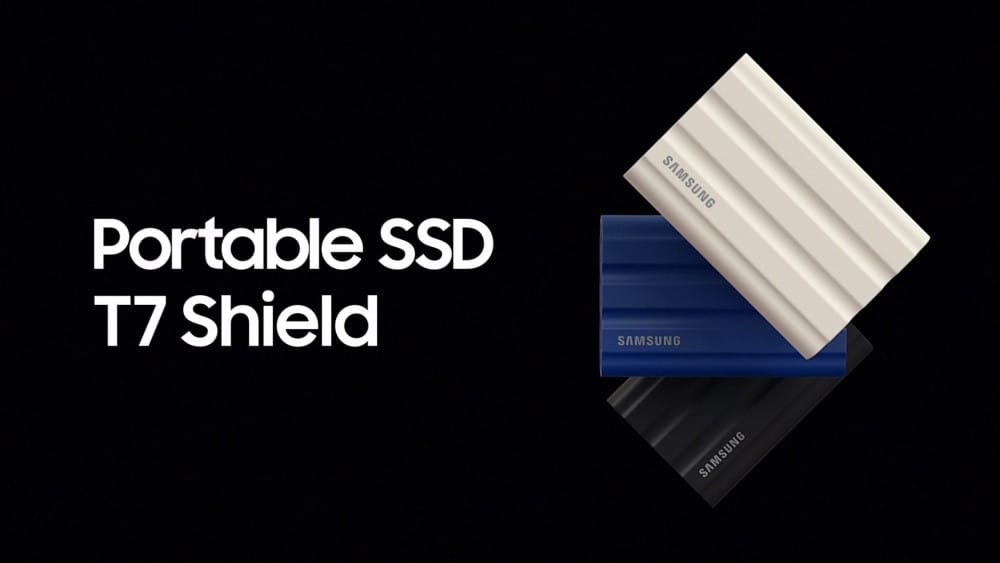
The Shield in the name refers to the rugged design: IP65 dust and water resistance, 3-meter drop rating, and a rubber-coated exterior that absorbs impacts and improves grip. At under $100 for the 1TB version (often sale-priced lower), it's the cheapest way to get a name-brand portable SSD with serious durability. The matte rubber finish also resists fingerprints far better than the T9's polished surface.
For backup duty, travel storage, or as a secondary drive for less-critical files, the T7 Shield delivers excellent value. Samsung's reputation for long-term reliability is well-earned, and the included 3-year warranty plus Magician software for health monitoring add peace of mind. Many users start with a T7 Shield as their first portable SSD and upgrade to a T9 or G40 only after they've identified specific performance needs.
Downsides: Slower than the T9 or X10 (1,050MB/s vs 2,000MB/s peak). The rubber coating, while protective, isn't as visually premium as aluminum. Only 3-year warranty. Limited to 4TB maximum capacity. Some users report the rubber edges collecting lint and pocket debris over time. Not as compact as the Crucial X10.
Budget buyers who want serious durability, travelers who toss their SSD in a bag without ceremony, and anyone who doesn't need top-tier speed. The best entry-level portable SSD that doesn't feel like a budget compromise.
Byteblip
New Products, Gift Guides, The Best Deals