
Best Label Makers (2026): Bluetooth + Handheld Picks
The best label makers for bins, cables, pantry labels, and home organization - Bluetooth and handheld picks that are actually easy to use.
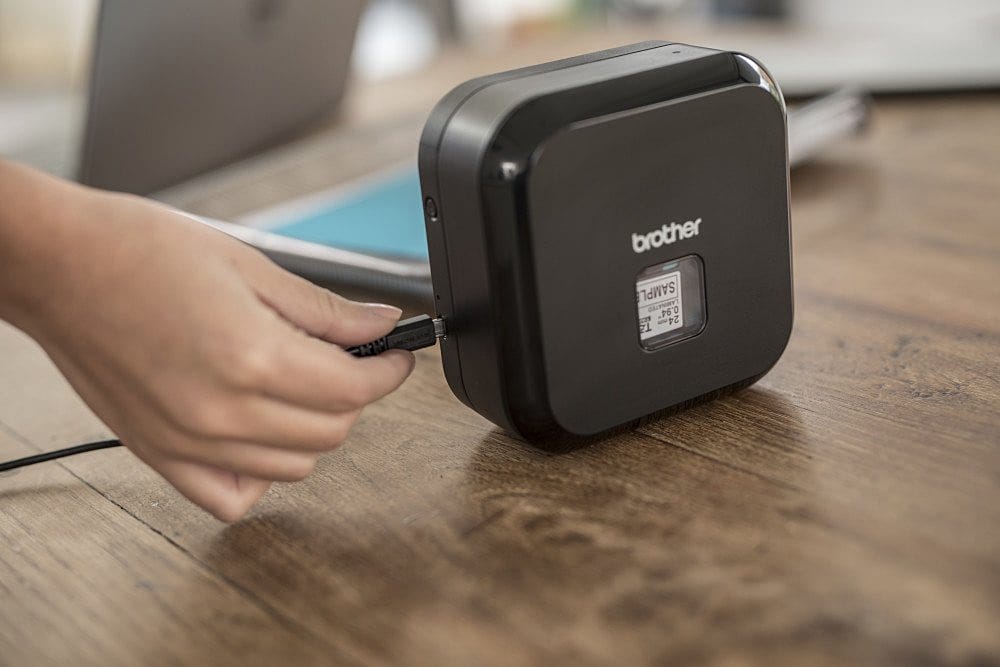
If you have ever opened a drawer and thought, "Why do we own five identical USB cables and none of them spark joy?" then you are my people. The best label maker is basically a tiny chaos management machine - it turns mystery bins into systems, and systems into you feeling smug for no reason. I tested and researched the most recommended label makers, focused on the ones you can actually live with, and picked the models that make organizing fun instead of a weekend-long identity crisis.
Quick vibe check: if you want pretty pantry labels, a Bluetooth label maker is your friend. If you want cable labels and quick, ugly-but-effective tags, a handheld with a keyboard still rules. Either way, you will want crisp printing, tapes that do not peel immediately, and a workflow that does not make you want to throw the thing into a junk drawer (which would be... ironic).
Our Top Picks
Brother P-touch Cube Plus (PT-P710BT) - Best overall Bluetooth label maker
Price: usually around $100-$120 - check price on Amazon
Downsides: Wastes a little tape at the start of each print, and you usually have to reconnect Bluetooth when you turn it back on.
People who want pro-looking labels for bins, pantry jars, files, and basically everything they can reach with two hands.
This is the label maker I recommend when someone says, "I want one label maker that just works." Wirecutter named the Cube Plus its top pick because it prints consistently sharp, durable labels and is unusually easy to use through the Brother Design&Print app (instead of a tiny calculator keyboard). The auto-cutter is the killer feature: you can bang out a stack of labels and they all come out clean and uniform.
What surprised me most is how much the app matters. With the Cube Plus, you are typing on your phone (or computer), picking fonts and templates, and getting labels that look like you paid an organizer with an all-white wardrobe to do your kitchen. It also supports wider tapes (up to 24 mm), which is what you want for big bin labels you can read from across the room.
- Why I like it: Auto-cut labels, rechargeable battery, lots of design flexibility, wide tape support.
- Who should skip it: If you hate apps or you want a built-in keyboard, the next pick is better.
Brother P-touch PT-D610BT - Best keyboard label maker (built-in screen + pro features)
Price: usually around $90-$120 - check price on Amazon
Downsides: Bigger and heavier than the Cube Plus, runs on AA batteries (unless you buy an adapter), and the on-device menus can feel fiddly.
People who want a label maker that can run totally standalone - no phone required - but still has Bluetooth as a bonus.
If the Cube Plus is "organized adult with a color-coded pantry," the PT-D610BT is "organized adult with a home office and a spreadsheet." Wirecutter lists it as the also-great pick for people who really want a built-in screen and keyboard. Professional organizers also love it for inventory and archiving style jobs, where you are labeling lots of categories and you want that all-in-one workflow.
I like this one for anyone doing serious projects: file boxes, long-term storage, labeling shelves, or making really consistent system labels that need to survive in a garage. It prints on the same durable TZe tapes as many other Brother models and supports wide tape sizes. The auto-cutter makes bulk printing way less annoying.
- Why I like it: Built-in keyboard and screen, auto-cut, lots of templates, great for long sessions.
- Who should skip it: If you want something pocketable, go handheld.
Brother P-touch PTD210 - Best simple label maker for home organization (no Bluetooth)
Price: usually $25-$50 - check price on Amazon
Downsides: More limited fonts and design options than app-based models, and the tiny screen is not exactly luxury.
Quick household labels: spice jars, kids school stuff, file folders, storage bins, and the stuff you need to label right now.
The Strategist talked to professional organizers and the PTD210 came up again and again as the best overall non-Bluetooth label maker. It has a QWERTY keyboard, simple templates, and the kind of interface you can learn in five minutes. This is the model I point people to when they want the "cheap, reliable, no drama" option.
It is also nice as a shared-family tool. No app logins, no Bluetooth mood swings. You put batteries in, type, print, move on with your life. If you are labeling in bursts (ten labels here, five labels there) this is plenty.
Brother P-touch PTH110 - Best handheld label maker for cables and quick fixes
Price: usually $25-$40 - check price on Amazon
Downsides: Not ideal for big, pretty bin labels, and the small keyboard is not fun for long typing sessions.
Cord labels, tool drawers, garage bins, and anything you are labeling while standing up and holding the thing like a TV remote.
Handheld label makers are not dead - they are just more niche now. Professional organizers like the PTH110 because it is portable, uses durable Brother tapes, and is great for cable labeling (think: HDMI, chargers, Ethernet). If you have ever unplugged your router and immediately regretted every life decision that led you there, label your cables. Future-you will be weirdly grateful.
Brother P-touch PT-N25BT - Best cute budget option (simple connected model)
Price: around $60 (varies) - check price on Amazon
Downsides: Manual cutter and narrower tape (12 mm max), so it is not the best choice for big pantry labels.
People who want a smaller, cheaper label maker with Bluetooth, but are fine keeping labels simple.
The PT-N25BT is a fun middle ground: it has a real keyboard and screen (so you can print without your phone), but it also has Bluetooth so you can use the Brother Design&Print 2 app when you want more options. Brother specs it at 180 dpi, about 12 mm/sec print speed, and it is designed for 12 mm Btag tapes. If you want to label lunch containers, notebooks, or kids stuff, it is a solid, affordable vibe.
Buying Guide: How to Pick the Best Label Maker
Start with the real question: do you want an app or a keyboard?
If you want nicer fonts, cleaner layouts, and fewer button-mashing sessions, go Bluetooth. The Cube Plus style printers make it easy to design labels that look intentional. If you want something you can grab and label without thinking, a keyboard model is faster in the moment.
Choose tape type like you are buying shoes: for the environment
For kitchens, garages, and anything that gets splashed or handled a lot, look for durable tapes (Brother TZe laminated tapes are popular for a reason). For simple indoor labeling, cheaper tapes can be fine.
Auto-cutter: the luxury you will miss once you have it
If you print more than a handful of labels at a time, an auto-cutter saves time and makes everything look uniform. Manual cutting is fine for occasional use, but it gets old fast.
How wide do your labels need to be?
Wide tape (like 18-24 mm) is what makes big bin labels easy to read. Narrow tape (6-12 mm) is better for cables, small containers, and subtle labeling.
One more thing: label makers can create their own clutter
Hot take: do not buy a label maker unless you will store it somewhere that makes sense. If you have to dig it out from a random closet, you will stop using it and the label maker becomes the next thing you need to organize. Put it where you will actually reach for it.
Want to keep going? If you are in full organization mode, check out our guide to sleep masks (because blackout curtains are not always an option) and our roundup of dash cams (because sometimes you need to label your car with evidence).
Byteblip
New Products, Gift Guides, The Best Deals

